
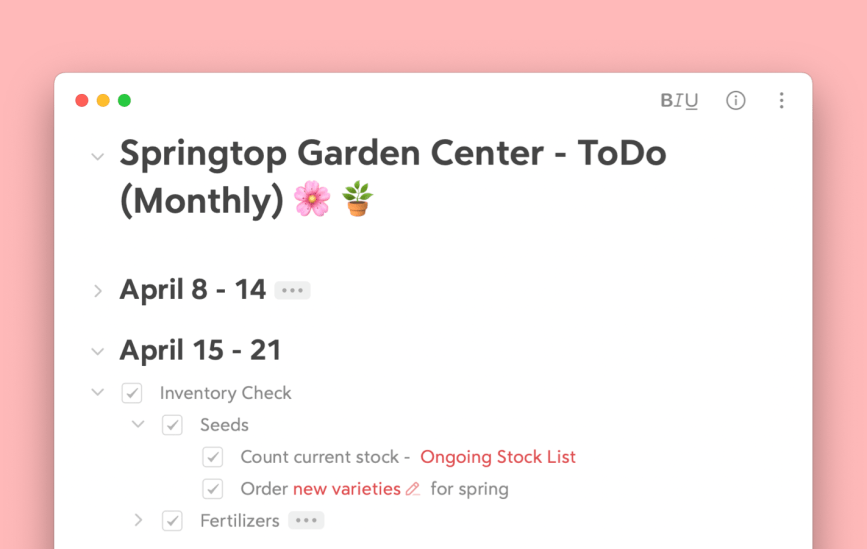
Staying organized can be a challenge, especially when juggling multiple projects, ideas, and tasks. That’s where folding comes in—a powerful feature that helps you clean up your notes and keep everything neatly tucked away.
Whether you’re a student, professional, or creative, these tips will help you master the art of folding. In case you missed it, in update version 2.2 we completely revamped folding in Bear, it now has a sparkling new look, check it out here.
Let’s get into the essentials 🛫
What is folding?
Folding is a powerful feature that allows you to collapse or hide sections of your notes. This can be really helpful to reduce visual clutter and make it easier to navigate through large or complex notes by only displaying the sections that are currently needed.

How to use Folding?
Folding has been around since Bear 2 launched, however recently we’ve integrated folding into the Side Actions to give you a quicker and easier way to manage sections with just a single click. It has never been easier to navigate your notes without tiring your fingers scrolling.
Check out our FAQ page for more information on folding, where you’ll find additional methods beyond this overview of the new folding system. 📝
Mac
- Move the cursor to the left side of the editor text
- Folding chevrons for collapsible sections will appear
- Click the chevron to toggle folding
iOS
- Go to the more menu (⫶) on the top right in a note
- Select “Toggle Side Actions” in the menu
- Side Action icons will appear on the left side and remain visible
- Tap the folding chevrons to toggle the folding
Useful things to know
Hide sections of long notes – Regardless if your note is 5,000 words or 50,000 words, folding sections is a great way to stay focused and hide away any distractions.

Easily move folded sections – The ability to drag and drop folded sections makes reorganizing your notes incredibly easy. We have many bookwriters in the Bear community who can attest that editing long documents can be tiresome, so being able to grab a folded section and move it where needed can save you a lot of time.

Fold Multi-level lists/todos – Writing lists in Bear is an extremely helpful method of keeping your thoughts and tasks aligned, but did you know you can also fold sublists or subtasks. This allows you greater control over your planning and can make detailed lists more organized.

Folding & TOC – Combine folding with the table of contents for an extra boost of productivity. Jump from section to section easily in the table of contents and with 1 click, fold or unfold your sections. Extra tip, drag your info panel to the side to have it float outside your note, this will allow it to stay put and update its info depending on the note you are viewing.

Let’s Fold It Up
Folding can really change the way you manage your tasks and projects. Enjoy a smoother, more efficient workflow that helps you stay on top of your responsibilities without distraction. Give folding a try and let us know in what magical ways you have folded up your notes. 😄 🪄
Reach out to us on Reddit, Twitter, Facebook, our new Community Forum, or directly at bear@shinyfrog.net ❤️