

To kick off our first blog post of the year, we want to wish you all a Happy New Year! 🎉
Here at Bear, we had an incredible 2023. We started the year with a team meet-up in Dublin, Ireland , released our biggest update yet Bear 2.0 and wrapped up the year in a nice shiny bow with plenty of bug fixes and minor updates that allowed us to start 2024 strong 💪.
We brought Panda, our Markdown editor, back from the dead last week. You can check it out here. 🐼
Grab your notes and let’s go!
A new year brings many things, excitement, and the overwhelming pressure to be productive. Keeping both your digital and personal life organized is one of the best ways to maintain your focus and stay productive.
Here are some tips for keeping your notes organized. 🚀.
Create a Tag Hierarchy & make use of subtags
Tags are the foundation of staying organized in Bear, so if you like categorizing your notes, this is an essential feature for you. As a result of using tags, you can keep your workspace tidy and avoid clutter on your Notes List. Here’s a few small tips for you:
- Break down your tags into broader categories, like
#projects#meeting notes#or#ideas. By doing this, you can store all notes in temporary homes so that you can work on them at your own pace. - Use the untagged section in the sidebar to find all your notes that have no tag assigned, this is a great place to start your organizing.
- A great tip is to try hiding subtag notes, this allows you to find all notes without a certain father tag. To hide subtag notes: click a tag > click the arrow next to the tag in the note list > hide subtag notes
Some of our other blogs on getting started with tags:
- How to think with tags & create a habit in Bear Part 1
- How to think with tags & create a habit in Bear Part 2
- Organize things in your home with Bear and nested tags
- Getting started with using and organizing tags in Bear
If you are a beginner, try some of these methods:
- The PARA Method: a simple, comprehensive, yet extremely flexible system for organizing any type of digital information across any platform. The PARA Method: The Simple System for Organizing Your Digital Life in Seconds
- The Zettelkasten Method: Zettelkasten is about optimizing your workflow of learning and producing knowledge.
- How to Organize Your Notes in Bear – The Mindful Teacher
- My workflow as a Financial Advisor – Adezeno
Review your notes
Bear has a fantastic feature that is very very underutilized, the Trash. This is where some of your notes are destined to go, stop hanging on to those old meeting notes from 3 years ago and let go of that ground-breaking app idea you had after waking from an especially good nap. They were great at the time, but ultimately, not needed in the long run.
Another tip is to empty the trash. Right-click on the trash icon and let those notes go, they will be happier in the void. Trashing notes is the most effective way to keep your workspace clean since many notes are only needed for a short period. We recommend frequently reviewing, removing, and archiving notes to keep your space peaceful.
The archive feature is also very useful for keeping notes you don’t use often but want to keep. This feature allows you to store your notes in a nice private space so they don’t clutter up your Note List, and you can easily access them at any time.
Use our advanced search to make finding your notes a lot easier, for example, @cdate(2018) to find all notes created in 2018; @done to find all notes that all todos are done.
See the full list of special search commands here.
Try some new features
A large part of Bear’s magic is that features remain out of sight until you need them, but this can mean that there are features you may not even know we have.
Let’s take a look at some popular features that can make your note-taking experience even better and in turn, bring more order to your notes.
Tables
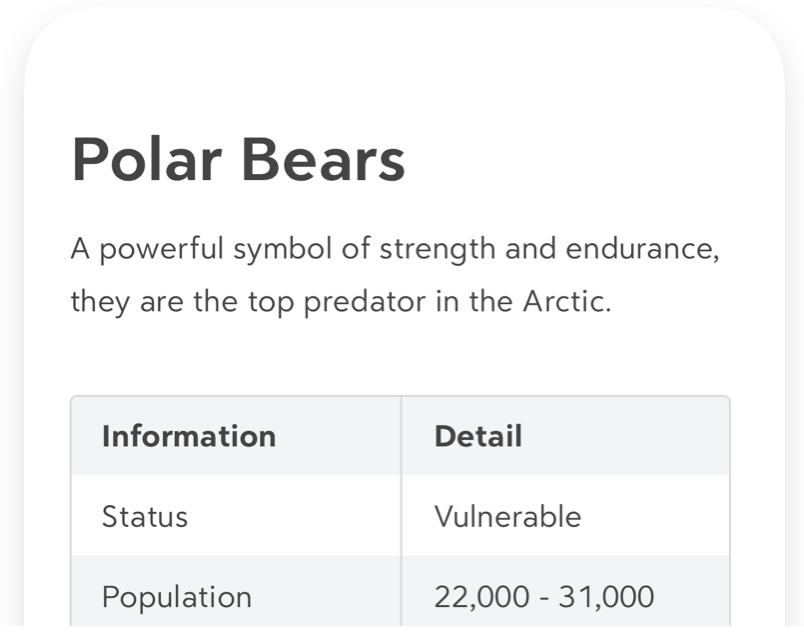
Tables are the best way to grab all that loose data you have and put it into a clean visual format. Imagine all those #recipes #bookstoread and #movie reviews# in an easy-to-read table instead of a long hand-cramping note that takes the same amount of time to read as it does to pick a new movie or prep the cake ingredients.
Change Preview Styles

Bear offers 3 different preview sizes, small, medium, and large with the option to also hide attachments. Changing your Notes List preview style is a great way to make your view less crowded, Play around with the styles and see what works for you.
Pin your favourite tags

Pinning your favourite tags is a good way to keep everything you need close at hand. Pinning tags keeps them at the top of your tag list, so even if you are a tag fanatic, you can still always find your most used tags. Knowing that the ones you use the most will always be right at the top.
Voila
This is just a general guide to bringing order back into your life one note at a time. We are always sharing tips and tricks to making the most of Bear on our social media. If you enjoyed this guide, consider heading over there for 10x more content and 20x more fun!
We’d love to hear your thoughts on Bear, or anything else! On Reddit, Twitter, Facebook, or directly at bear@shinyfrog.net.